Samsung has introduced a major upgrade to its Galaxy S26 series by enabling AirDrop compatibility through its Quick Share feature, allowing seamless file sharing between Android and Apple devices. Starting March 23, the rollout began in South Korea and is expanding to global regions in phases.
With this update, Galaxy S26 users can send photos, videos, and documents directly to iPhones, iPads, and Macs without relying on third-party apps. This development marks a significant shift toward cross-platform compatibility and aims to simplify file sharing across different operating systems.
Key Highlights of Samsung Galaxy S26 AirDrop Support, Setup, and Compatible Devices
- AirDrop compatibility introduced via Quick Share on Galaxy S26 series
- Supports file sharing with iPhone, iPad, and Mac devices
- Rollout started March 23 in South Korea, expanding globally
- Available on Galaxy S26, S26+, and S26 Ultra
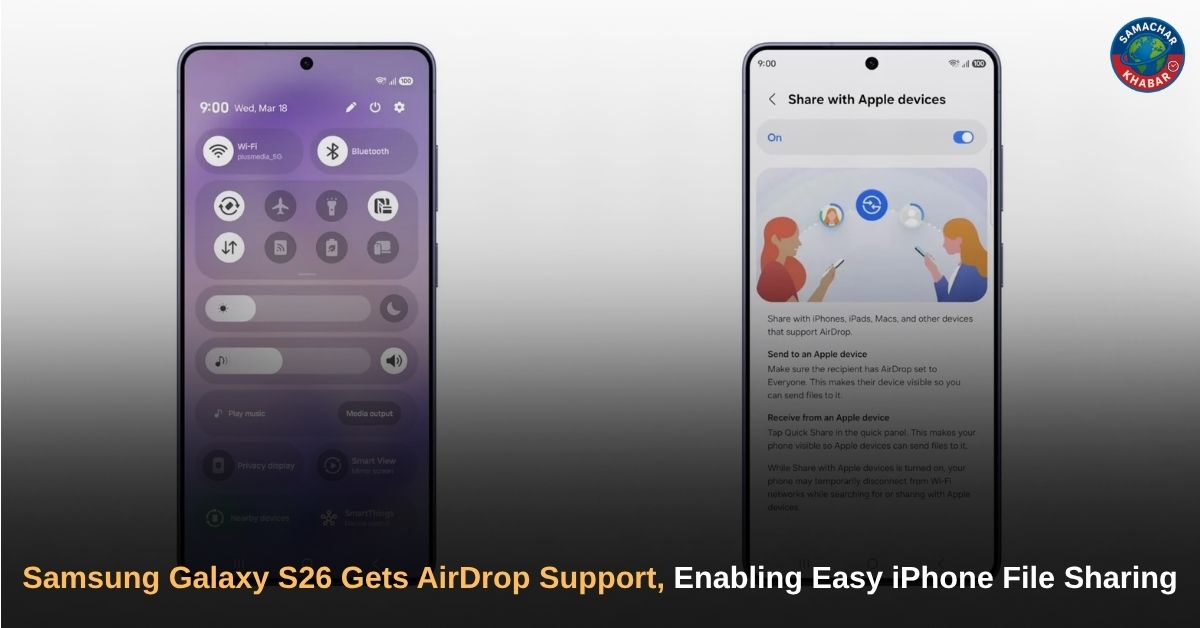
- Requires enabling “Share with Apple devices” in Quick Share settings
- Apple device AirDrop visibility must be set to “Everyone”
- Requires Google Play Services version 26.11.xx or higher
- Requires Quick Share version 13.8.51.30
- Software update size is over 700MB
- Firmware version S94xNKSU1AZCF (initial rollout)
- Feature not enabled by default; manual setup required
- Expansion to additional Galaxy devices planned
Samsung Enables AirDrop on Galaxy S26 Through Quick Share
Samsung has integrated AirDrop compatibility into its Quick Share feature, allowing Galaxy S26 users to detect nearby Apple devices and transfer files wirelessly. This removes the need for third-party applications, email transfers, or messaging platforms when sharing files between Android and iOS devices.
Users can access this functionality through Quick Share, where nearby Apple devices appear once visibility settings are enabled on both devices. The process is designed to be simple and similar to native AirDrop usage on Apple devices.
Rollout Timeline and Global Availability
The rollout of AirDrop compatibility began on March 23 in South Korea. Samsung has confirmed that the feature will gradually expand to multiple regions, including:
- North America
- Europe
- Latin America
- Southeast Asia
- Hong Kong
- Japan
- Taiwan
Availability may vary depending on region and rollout phase. Users in the United States and other regions may receive the update shortly after the initial release.
Supported Devices for AirDrop on Samsung Galaxy
Currently, AirDrop compatibility is limited to the Galaxy S26 series:
| Device Model | Availability Status |
| Galaxy S26 | Available |
| Galaxy S26+ | Available |
| Galaxy S26 Ultra | Available |
Samsung has confirmed that additional Galaxy devices will receive this feature in future updates, although no specific timeline or device list has been announced.
Technical Requirements and Software Details
To use AirDrop compatibility on Galaxy S26 devices, users must ensure the following requirements are met:
- Google Play Services version 26.11.xx or higher
- Quick Share version 13.8.51.30 installed via Galaxy Store
- Latest software update installed (over 700MB)
- Firmware version S94xNKSU1AZCF (initial rollout)
- Apple device AirDrop visibility set to “Everyone”
- Galaxy device visibility enabled
The update currently includes the February 2026 security patch and is the second update released for the Galaxy S26 series.
How to Enable AirDrop on Samsung Galaxy S26
The AirDrop compatibility feature is not enabled by default. Users must manually activate it through device settings.
Steps to Enable:
- Open Settings on your Galaxy S26 device
- Navigate to Connected Devices
- Tap on Quick Share
- Enable “Share with Apple devices”
How to Share Files from Samsung Galaxy S26 to iPhone
Once the feature is enabled, users can follow these steps to transfer files:
Steps to Share Files:
- Open Quick Share
- Select the file you want to send
- Look for nearby Apple devices
- Select the desired device
- Tap to send
Both sending and receiving files are supported. The Apple device must have AirDrop visibility set to “Everyone” for successful detection and transfer.
Google’s Role in Bringing AirDrop Compatibility to Android
The technology enabling AirDrop compatibility on Android devices was first introduced by Google. In November 2025, Google rolled out this feature on the Pixel 10 series, which was later expanded to the Pixel 9 lineup in 2026.
This solution allows Android devices to interact with Apple’s AirDrop protocol without Apple’s direct involvement. Samsung has adopted this approach, becoming the second Android brand to offer native AirDrop compatibility.
Why AirDrop on Samsung Galaxy S26 Matters
Sharing files between Android and iPhone devices has historically been challenging, often requiring third-party apps, cloud services, or messaging platforms. Samsung’s latest update simplifies this process by enabling direct wireless sharing between devices.
Also Read: Samsung Galaxy S26 Series Specifications, Privacy Display, Performance, Camera and Global Prices
This improvement is particularly useful in everyday situations such as sharing photos, documents, or videos between users on different platforms.
Impact on Cross-Platform Connectivity
AirDrop has long been a defining feature of Apple’s ecosystem. With Samsung introducing similar functionality across platforms, users can now share files more easily regardless of the operating system they use.
This development reflects a broader industry shift toward improved interoperability and reduced dependence on ecosystem-specific features.
Future Expansion to More Galaxy Devices
Samsung has confirmed that AirDrop compatibility will expand beyond the Galaxy S26 series. While no official timeline has been provided, the feature is expected to reach additional Galaxy smartphones and tablets through future updates.
Users of older Galaxy devices will need to wait for further announcements regarding availability.
Samsung Galaxy S26 Series Overview
The Galaxy S26 series was unveiled at the Galaxy Unpacked 2026 event and includes three models:
- Galaxy S26
- Galaxy S26+
- Galaxy S26 Ultra
These devices focus on AI-driven features, enhanced performance, and improved connectivity. The addition of AirDrop compatibility further enhances their usability across different ecosystems.
True Knowledge Beyond Technology: Saint Rampal Ji Maharaj Ji
While technology is making life easier, it cannot provide true peace or purpose. According to Saint Rampal Ji Maharaj Ji, real happiness comes from understanding the true aim of human life through spiritual knowledge.
Despite modern advancements, stress and dissatisfaction remain because material success is temporary. His teachings explain that only true devotion to the Supreme God leads to lasting peace and salvation. In today’s connected world, his message reminds us to focus not just on digital progress, but also on inner spiritual growth for complete fulfillment.
A Major Step Toward Seamless File Sharing Across Android and iOS
Samsung’s introduction of AirDrop compatibility on the Galaxy S26 series represents a significant advancement in cross-platform file sharing. By enabling direct communication between Android and Apple devices without third-party tools, the company is addressing a long-standing limitation.
As the rollout expands globally and to more devices, this feature has the potential to become a widely adopted solution for file sharing, improving convenience for users across different ecosystems.
FAQs on Samsung Galaxy S26 AirDrop Support, Setup, and File Sharing
1. Does Samsung Galaxy S26 support AirDrop?
Yes, Galaxy S26 supports AirDrop via Quick Share, allowing file sharing with iPhones, iPads, and Macs after enabling “Share with Apple devices” in settings.
2. How to use AirDrop on Samsung Galaxy S26?
Go to Settings > Connected Devices > Quick Share, enable “Share with Apple devices,” then select files and share with nearby Apple devices.
3. Which Samsung phones support AirDrop compatibility?
Currently, only Galaxy S26, S26+, and S26 Ultra support it. Samsung has confirmed expansion to more Galaxy devices in future updates.
4. What is required to use AirDrop on Galaxy S26?
You need Google Play Services 26.11+, Quick Share latest version, updated software, and Apple device AirDrop visibility set to “Everyone.”
5. When will AirDrop support be available globally on Galaxy S26?
The rollout started March 23 in South Korea and is expanding to regions like the US, Europe, Asia, and more in phases.